



Models
>
PK7800SK5SS
PK7800SK5SS General Electric Range
Jump to:
Find Part by Name
Keep searches simple, eg. "belt" or "pump".
Keep searches simple, eg. "belt" or "pump".
$26.19
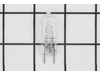
This halogen lamp lights the inside of a compatible microwave or the cooktop area below it, replace the lamp if the light is dim or no longer turns on, turn off power and let the lamp cool before remo...
In Stock
Order now and your part arrives by Oct 11
In Stock
Order now and your part arrives by Oct 11
In Stock
Order now and your part arrives by Oct 11
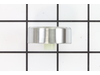
This is a control knob for your microwave. The knob is about 1.5 inches in diameter, is black and silver in color, and is sourced directly from the original manufacturer.
No Longer Available
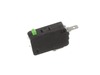
$37.49
This switch monitor interlock helps your microwave detect when the door is properly closed. If it’s damaged, the microwave may not start. Replacing it restores safe operation and is a quick fix with basic tools.
In Stock
Order now and your part arrives by Oct 11
In Stock
Order now and your part arrives by Oct 11
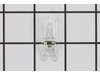
$25.10
This OEM halogen bulb provides warm white light for top-mounted oven lighting. It operates at 120V and 40W, with a G9 base designed for high-heat environments. Ideal for replacing a dim or burnt-out b...
In Stock
Order now and your part arrives by Oct 11
$39.95
This diode cable is a replacement electrical component designed to regulate current flow within an appliance circuit. It helps protect sensitive components and is commonly replaced when electrical fau...
In Stock
Order now and your part arrives by Oct 11
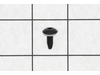
$15.26
This part is a replacement screw for your oven. It is made of black metal and is sold individually. This screw is approximately 1/4 inch in diameter and about 1/2 inch in length. It is designed to con...
In Stock
Order now and your part arrives by Oct 11
In Stock
Order now and your part arrives by Oct 11
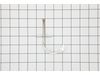
$35.84
This temperature sensor helps regulate heat inside the oven by sending temperature readings to the control board. It ensures consistent cooking and helps maintain the set temperature. A faulty sensor ...
In Stock
Order now and your part arrives by Oct 11
In Stock
Order now and your part arrives by Oct 11
Common Problems and Symptoms for PK7800SK5SS
Viewing 8 of 8Won’t turn on
Fixed by these parts
How to fix it
No heat
Fixed by these parts
How to fix it
Doesn’t shut off
Fixed by these parts
How to fix it
Tray won’t turn
Fixed by these parts
How to fix it
Will Not Start
Fixed by these parts
How to fix it
Oven is too hot
Fixed by these parts
How to fix it
Oven not heating evenly
Fixed by these parts
How to fix it
Touchpad does not respond
Fixed by these parts
How to fix it

Keep searches simple. Use keywords, e.g. "leaking", "pump", "broken" or "fit".
- Customer:
- Michael from Ridgefield, CT
- Parts Used:
- WB24X10047
- Difficulty Level:
- Really Easy
- Total Repair Time:
- Less than 15 mins
- Tools:
- Screw drivers
Microwave would turn on and count down, but not heating and not rotate turntable. Pressing door up would occasionally start heat.
First I disconnected the power and opened the door. Then I removed the top screws holding the top vent louvers, then removed the screw at the top of the touch pad. The touch pad removes by sliding up slightly then tilting top out. I unscrewed two screws holding the door latch assembly. Press the tab to remove and replace switch. Reco
... Read more
nnect wires, reseat latch mount by placing top bracket tab in place first, allign and secure with screws. Reseat touch pad by placing bottom tabs in first, tilt forward and press up to seat top tabs, secure with top screw. Secure vent louver screws, plug in and watch your microwave work again.
Read less
Was this instruction helpful to you?
Thank you for voting!
- Customer:
- Thomas from Andover, NJ
- Parts Used:
- WB24X10047
- Difficulty Level:
- Really Easy
- Total Repair Time:
- 15 - 30 mins
- Tools:
- Pliers, Screw drivers
Microwave runs with the door open
Remove microwave outer cover. Turn on side & locate the upper & lower door switches. Better to replace in pairs even if one is ok. Remove the wire harness to each switch. Then replace switch and re connect the wire harness. Re attach outer cover
and test to see if that solved the problem. If so then well done!!
and test to see if that solved the problem. If so then well done!!
Was this instruction helpful to you?
Thank you for voting!
- Customer:
- Thomas from Goshen, IN
- Parts Used:
- WB26X31060
- Difficulty Level:
- Easy
- Total Repair Time:
- 30 - 60 mins
- Tools:
- Nutdriver, Socket set
Blower Fan quit working
It took a while to remove approx 30 screws to get to the blower. So my oven was sitting, torn apart while I waited on the new blower fan that I had ordered. It arrived shortly, about 5 days. When I opened the box I saw that PARTSELECT had sent me a drain pump instead of the blower fan that I had ordered. Since an oven does not require a d
... Read more
rain pump and it wouldn't work to replace my broken blower fan I had to return it. I was told that I needed to send the part back in order to get a refund. After I sent their drain pump back at a cost of $13 they emailed me and said I didn't need to send the drain pump back. And they refunded me minus shipping So I had to pay shipping both ways for a part that was wrong. And I ordered it from someone else. I put the new blower fan that I had bought from another company in and replaced the 30 screws. And the oven has been working fine ever since. Thank you PARTSELECT for allowing me to tell people how you operate. They have a money back guarantee, but they don't give you back ALL your money. Thanks Again.
Read less
Was this instruction helpful to you?
Thank you for voting!